I am a big fan of collecting and tracking the data from all the sensor device gadgets I use in my workout. For indoor cycling, I recently bought an Elite Qubo Power Fluid trainer, so I wanted to get the power curve into the software I am using for tracking cycling, Golden Cheetah.
First Build
Using homebrew we install Qt4. I did not try with Qt5 which is not as widely used anyway as Qt4.
{% highlight bash %} brew install qt4 {% endhighlight %}
Then checkout the Golden Cheetah code out of github:
{% highlight bash %} git clone git://github.com/GoldenCheetah/GoldenCheetah.git {% endhighlight %}
We then create the qmake config files that will generate the GNU Makefile:
{% highlight bash %} cd GoldenCheetah cp qwt/qwtconfig.pri.in qwt/qwtconfig.pri cp src/gcconfig.pri.in src/gcconfig.pri {% endhighlight %}
We edit src/gcconfig.pri to uncomment the OSX options:
{% highlight Makefile %}
Uncomment this line if you have SDK 10.7 or higher
DEFINES += GC_HAVE_LION
uncomment below if you are running on the 10.9 developer preview
INCLUDEPATH += /Library/Developer/CommandLineTools/SDKs/MacOSX10.9.sdk/usr/include/ {% endhighlight %}
To enable the USB2 ANT+ dongle support (libusb-compat provides a 0.1 version wrapper interface using the libusb 1.0 implementation):
{% highlight bash %} brew install libusb-compat {% endhighlight %}
And change src/gcconfig.pri to enable USB:
{% highlight Makefile %} LIBUSB_INSTALL = /usr/local #LIBUSB_INCLUDE = LIBUSB_LIBS = -lusb {% endhighlight %}
Note the LIBUSB_LIBS directive to point to libusb.a, which if we
installed libusb with Homebrew, it is a symbolic link to the compat
version 0.1.4. If we leave the directive empty, which is the default
the config make system will pick up libusb-1.0.a, which will be
missing symbols during final linking with the GoldenCheetah app.
I tried to make at this point but it failed saying it could not find the .qm files. Looking on the web these seem to be generated translation files. So I did init these translation files, although I am not sure why this is required and not caught by the Makefile. In any case:
{% highlight bash%} lrelease src/src.pro {% endhighlight %}
And build:
{% highlight bash%} qmake -recursive make {% endhighlight %}
The app once built is found under src/GoldenCheetah.app.
Quick Note on Other Dependencies
- SRMIO. Serial communication protocol to the SRM bike power meter. I don’t need it.
- Liboauth. To post to twitter. I don’t think need it.
- libkml. Export to Google Earth. I don’t think I need it.
- QwtPlot3d. Hmm … not sure what this is for, yet.
- libical. Don’t know, I skip.
- clucene. Don’t know yet if I need it, so I skip.
Elite Qubo Power Fluid as a Virtual Powertap
PowerCurveSensor.com provides a power curve for this trainer unit. The manufacturer also provides a curve, but I did not find it to be as accurate. I fit the speed-to-power curve using a cubic equation. The resulting equation is:
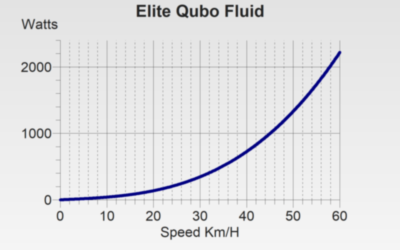
f(x) = 4.31746 * x + -2.59259e-002 * x^2 + 9.41799e-003 * x^3
where x is expressed in km/h and f(x) is measured Watts. We add the switch case in RealtimeController.cpp:
{% highlight C++ %} case 42: { double V = rtData.getSpeed(); // Power curve fit from powercurvesensor rtData.setWatts(4.31746 * V - 2.59259e-002 * pow(V, 2) + 9.41799e-003 * pow(V, 3)); } break; {% endhighlight %}
We also need to change the UI code in AddDeviceWizard.cpp:
{% highlight C++ %} virtualPower->addItem(tr(“Power - Elite Supercrono Powermag (8)”)); virtualPower->addItem(tr(“Power - Elite Qubo Power Fluid”));
wheelSize->addItem(tr(“Road/Cross (700C/622)”)); // 2100mm wheelSize->addItem(tr(“Tri/TT (650C)”)); // 1960mm
{% endhighlight %}
Recompile by invoking make and open the app. Add a new speed and cadence ANT+ sensor device, and voilá, the Qubo Fluid shows up in GoldenCheetah as a virtual powertap.